# Stock

# Open Stock

Each warehouse has its own stock of various products. The container manager has to open the stock in order to make the products available to the drivers. On the app, you can access the **Stock** tab and manage the container’s stock levels, as well as fill orders, report defectives, and close stock.

<span id="bkmrk--4" style="font-weight: normal;"><span style="font-size: 12pt; font-family: 'Nunito Sans', sans-serif; color: rgb(0, 0, 0); background-color: transparent; font-weight: 400; font-style: normal; font-variant: normal; white-space: pre-wrap;"><span style="border-width: initial; border-style: none; display: inline-block; overflow: hidden; width: 274px; height: 485px;">![](https://lh6.googleusercontent.com/rVOUqETGO3aqq3etV1p0gx4HtbNmME5tAroUXVw3q4_SB4lIZFr3X3KLB74tttCDDhg9agXDlqIR539LBBomQVq1Nehz2aPHYNg07Z5dWg9sz9Zo-IATry79db3eYEs8a7Pa93r3Zrghr1_1CE6nBBQzQ5Wh_sDKddmaRyIzMoaa5PuTo33G2Ay80A)</span></span></span>

To select the available products, you will have access to a product catalog and be able to choose the amount for each one of them. All inputs should be filled even if the amount is 0.

<span id="bkmrk--5" style="font-weight: normal;"><span style="font-size: 12pt; font-family: 'Nunito Sans', sans-serif; color: rgb(0, 0, 0); background-color: transparent; font-weight: 400; font-style: normal; font-variant: normal; white-space: pre-wrap;"><span style="border-width: initial; border-style: none; display: inline-block; overflow: hidden; width: 259px; height: 457px;">![](https://lh3.googleusercontent.com/YI_dK7wCRU09D5uiEht8fbJuVrSrmJgmnnArZ5872BaxEliFE6OKVDroFiuDJRp92e_lXWCg-1kfBTSL4OrFm9xpC3DjtpCRQYosznWhOanQsaR3dUDNyjmUhFr3nBv0RJT7L6DsDJVRLXGf6e60JTmrO9wzhQoj5CFNizIX0NQnhxLlIAGKFxTvlg) </span></span></span>

![](https://lh4.googleusercontent.com/l6SXhSl03vi83it7m7ti3DJwHrWrIcB2NPx5KHrNadRcEGnjqIdPNLLFUdMlxQuUWltSLSiWDEFhlqRXmIQXRGPVMvIFlDGUjxbXHolmZmwfunrYJ_-PlThPlDh2bztveOKRBiM0JSZaf3uz8opbnFl9Y0gxGWcmGZirvC14BsTwcP80OjGOla_7aQ)

After selecting the products, you will be able to access to the stock summary with the Container name and all the listed products. If everything is correct, confirm and open stock.

<span id="bkmrk--6" style="font-weight: normal;"><span style="font-size: 12pt; font-family: 'Nunito Sans', sans-serif; color: rgb(0, 0, 0); background-color: transparent; font-weight: 400; font-style: normal; font-variant: normal; white-space: pre-wrap;"><span style="border-width: initial; border-style: none; display: inline-block; overflow: hidden; width: 275px; height: 485px;">![](https://lh4.googleusercontent.com/aS7n_TA0H6cqyTbFSGMjbAbZaUrGiJBKlEMg-HlfXkpHMkynkGE-8GZ28wHk3OLzJW_o_nsty4NDNaBwqsshxUP781mSiGldxnBw8NzqmYOcA6c8iOuXUgm2zkkFEILxroBXyr4t8n5VjtOXiosBCExRedwJpi5HRGPMzFxnhZjFdXzcbPrRfoLLbQ)</span></span></span>

<span id="bkmrk--7" style="font-weight: normal;"><span style="font-size: 12pt; font-family: 'Nunito Sans', sans-serif; color: rgb(0, 0, 0); background-color: transparent; font-weight: 400; font-style: normal; font-variant: normal; white-space: pre-wrap;"><span style="border-width: initial; border-style: none; display: inline-block; overflow: hidden; width: 273px; height: 485px;">![](https://lh3.googleusercontent.com/vfxJoJmYelRm0LKGDk_3lOMwLXXJzAqLevIyG1WH_StvJYeRsxQjaz02Nqka9kqZ6ALoHjphsiS-uS-DWoCbUEs7P9wIpdoU8YoPxgtf0YmV684-Z00Dq_WZbP8CERMdSF1BQgy88OQTFj6VDZFw_yDEK4QpB1MjXyMFefzxAGp38TUB6Sp6zd_R3Q)</span></span></span>

When the stock is opened, you are able to perform other actions, until you close the stock.

<span id="bkmrk--8" style="font-weight: normal;"><span style="font-size: 12pt; font-family: 'Nunito Sans', sans-serif; color: rgb(0, 0, 0); background-color: transparent; font-weight: 400; font-style: normal; font-variant: normal; white-space: pre-wrap;"><span style="border-width: initial; border-style: none; display: inline-block; overflow: hidden; width: 249px; height: 442px;">![](https://lh5.googleusercontent.com/rlx4wNpbsD_4E8oJ27l5fOriYo1VzKn_Rr0N3aYP6A9POCrlz5fn64zTdKjTRbJdXAOqKDDSYvrYp6KKMg15SIUPhJF5Z6pJqhjkkX_pJ5WliYImfJhAZXseNHk_g3-2J5P8eRsYFgenpeE8Gj01jyvftrA1D2OrEqjg7oEsfOtFilS7Z2MM5siTOg)</span></span></span>

# Report defective

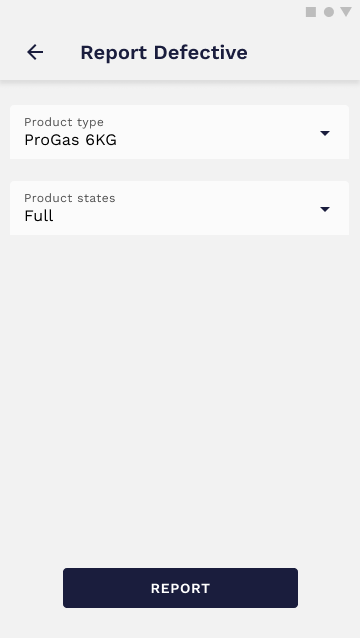
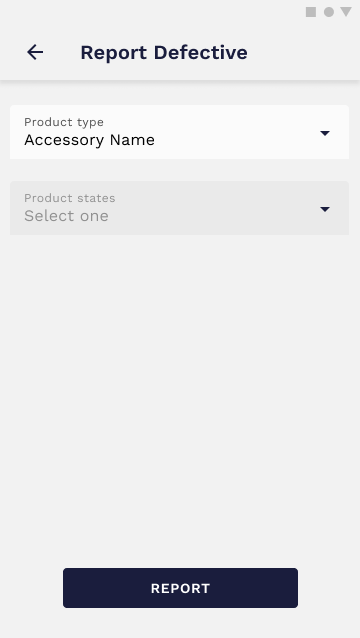
When you find a defective canister, it should be reported to the system. In order to do that, you should select the Product Type and the current state (Empty/Full).

[![Report Defective — without image — filled.png](https://wiki.circl.services/uploads/images/gallery/2022-09/scaled-1680-/report-defective-without-image-filled.png)](https://wiki.circl.services/uploads/images/gallery/2022-09/report-defective-without-image-filled.png)
[![Report Defective — without image.png](https://wiki.circl.services/uploads/images/gallery/2022-09/scaled-1680-/report-defective-without-image.png)](https://wiki.circl.services/uploads/images/gallery/2022-09/report-defective-without-image.png)
<p class="callout info">The reported products are marked as **Suspected Defective** until the **Auditor** marks them as **Defective**.</p>

# Filling orders

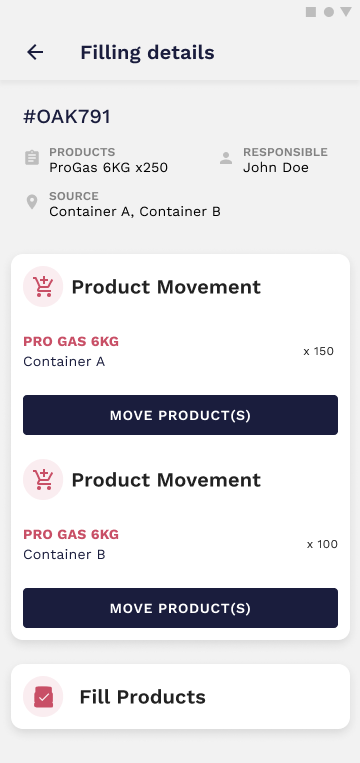
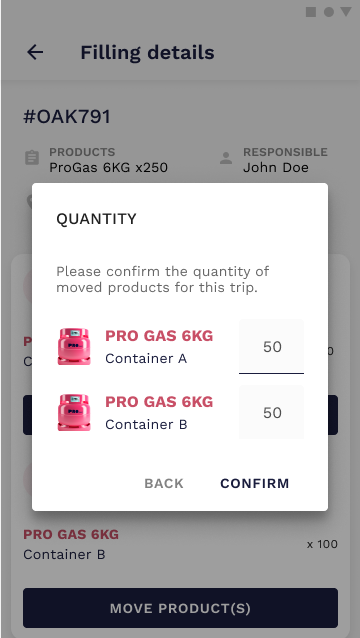
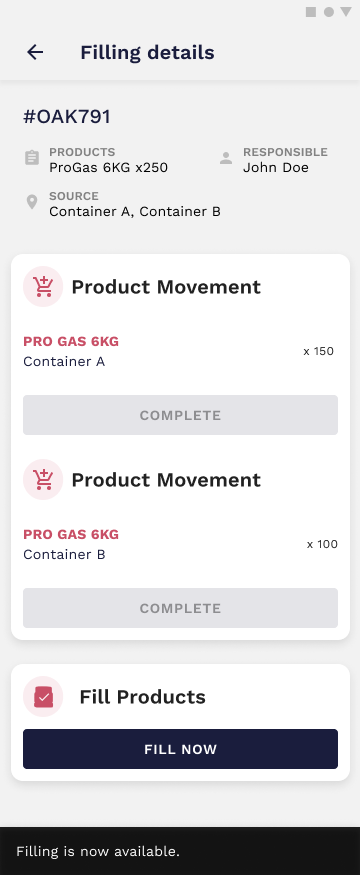
Filling orders are managed in the Back Office and displayed as cards on the App. To fill an order, you have to select one of the orders, analyze the details and move the required products first. After that, it becomes possible to fill the canisters.

[![Stock — fill canisters — details.png](https://wiki.circl.services/uploads/images/gallery/2022-09/scaled-1680-/stock-fill-canisters-details.png)](https://wiki.circl.services/uploads/images/gallery/2022-09/stock-fill-canisters-details.png)
[![Stock — fill canisters — details.png](https://wiki.circl.services/uploads/images/gallery/2022-09/scaled-1680-/Chxstock-fill-canisters-details.png)](https://wiki.circl.services/uploads/images/gallery/2022-09/Chxstock-fill-canisters-details.png)
[![Stock — fill canisters — details.png](https://wiki.circl.services/uploads/images/gallery/2022-09/scaled-1680-/fvVstock-fill-canisters-details.png)](https://wiki.circl.services/uploads/images/gallery/2022-09/fvVstock-fill-canisters-details.png)
# Extract gas

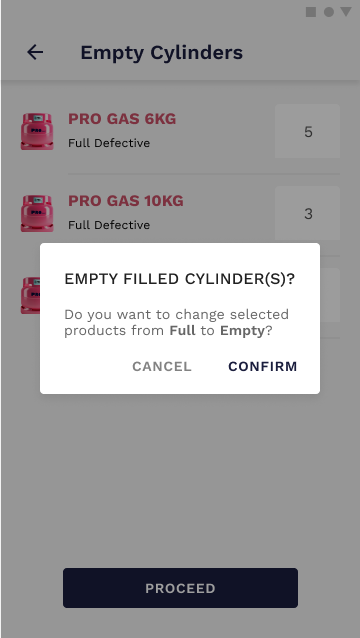
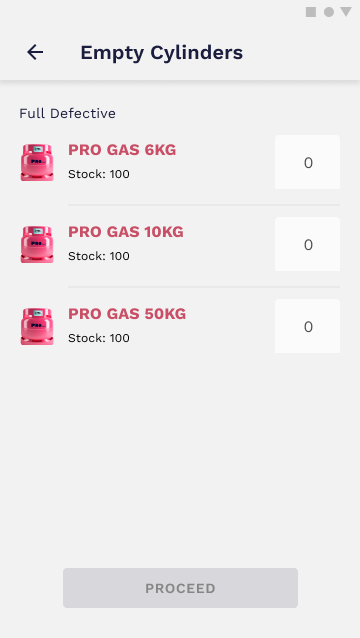
When a canister is marked as defective, it should be extracted. To do that, you'll have access to a list of products and the current stock. Select the number of canisters you want to empty and submit your selection.

[![Stock — empty canisters.png](https://wiki.circl.services/uploads/images/gallery/2022-09/scaled-1680-/stock-empty-canisters.png)](https://wiki.circl.services/uploads/images/gallery/2022-09/stock-empty-canisters.png)
[![Stock — empty canisters — confirmation.png](https://wiki.circl.services/uploads/images/gallery/2022-09/scaled-1680-/stock-empty-canisters-confirmation.png)](https://wiki.circl.services/uploads/images/gallery/2022-09/stock-empty-canisters-confirmation.png)